Three actions that are easy to confuse
Uninstalling an app removes software from a device. Canceling automatic renewal stops a future recurring payment under the applicable subscription procedure. Requesting a refund asks for money already paid to be returned under the relevant policy. Completing the first action does not normally complete the other two.
Before doing anything, identify who billed you: the provider’s website, Apple, Google Play, Amazon or another retailer. Find the purchase confirmation and the applicable subscription terms. A provider’s website guarantee may not be the process for an app-store purchase.
This guide summarizes policies checked for The VPN Deal. It does not promise refund approval or replace the terms applicable to a particular payment. Purchase-channel, verification, previous-refund and local-law qualifications can affect the result.
The current policy comparison
| Provider | Policy point to understand | Direct website renewal cancellation |
|---|---|---|
| NordVPN | Ordinary 30-day guarantee covers eligible initial purchases; terms have qualifications. | Nord Account → Billing → Cancel → Cancel auto-renewal. |
| Surfshark | Stated 30-day initial-purchase guarantee; recurring payments excluded. | Account → Subscription → Payments → Cancel auto-renewal. |
| PIA | Current terms include initial purchase and/or renewal requests within 30 days, subject to eligibility; marketing footers differ. | Client Control Panel → Next Billing → Turn off auto-renewal. |
| PureVPN | 31-day guarantee for the initial purchase; renewals, trial conversions, crypto and app-store purchases are excluded. | Member Area → Subscriptions → Cancel Subscription. |
| PrivateVPN | 30-day guarantee for new customers; its Terms exclude orders under USD 45, renewals, crypto and App Store purchases. | Account login on privatevpn.com → Cancel Subscription. |
NordVPN, Surfshark and PIA state that paid access continues through the current term after website auto-renewal is canceled. PureVPN and PrivateVPN point the same way without saying it outright: PureVPN’s account guide describes a Resume option before the current subscription expires, and PrivateVPN’s Terms say the agreement ends at the close of the period you paid for. Keep the confirmation and check the next-payment status in the account. The current interface may change, so use the provider’s official cancellation guide if labels differ.
NordVPN refund considerations
NordVPN’s ordinary guarantee focuses on eligible initial purchases rather than a general refund after each recurring payment. Its terms also include qualifications related to prior refunds and some local-law situations. Read the terms that apply to the transaction instead of relying only on a marketing banner.
For direct purchases, start through official support and follow the authenticated refund process. Apple, Amazon and retailer transactions may need those sellers’ procedures, while Google Play handling has separate guidance. Have your purchase information available and begin before the applicable deadline.
To stop another charge, use the current auto-renewal guide. That cancellation is distinct from the refund request.
Surfshark refund considerations
Surfshark’s support policy limits the 30-day guarantee to eligible initial purchases and excludes recurring payments. It also describes limits on repeat refunds and restrictions for payment methods and some additional services. A subscription with a guarantee should therefore not be described as a universally refundable trial.
Direct website requests start with support. Apple and Amazon purchases use those platforms’ routes, while Google Play handling depends on the transaction timing and policy. Prepaid or gift-card payments and some additional services have exclusions.
Use the refund eligibility page and auto-renewal cancellation guide for the actual steps. Read the full terms for conditions attached to a selected add-on.
PIA: explain the documentation conflict
PIA’s current terms explicitly refer to refund requests within 30 days of an initial purchase and/or renewal. Some pricing footers instead state that the guarantee is for new subscribers only. We preserve that conflict here and link the current terms rather than making a categorical claim that all renewals are excluded.
Eligibility and verification requirements still apply. The latest support guide excludes Apple/Google Play purchases from PIA’s direct guarantee and says gift-card and deal-site purchases are non-refundable. The terms also contain conditions related to a prior refund and responding to verification.
For a direct request, use the registered account email and order number with official support. Read the terms, eligibility guide and request process. Renewal cancellation is separate in the Client Control Panel.
PureVPN refund considerations
PureVPN’s refund policy lets you claim a refund within 31 days of the initial purchase. It states that the 31-day policy does not apply to renewal payments, and that trial-based renewals, where a trial turns into a paid subscription, are non-refundable. Its terms also make refunds subject to fair use and compliance with the Terms of Service, and say no refund applies if an account fails a requested identity check.
The payment method matters as much as the date. PureVPN says Coinpayment, Google Play and the Apple App Store do not support its refund option, and its payment-method table marks CoinGate, PayGarden, cryptocurrency and gift cards as not covered, while cards and PayPal are covered. Apple and Google handle refunds for app-store purchases themselves.
For a direct purchase, email help@purevpn.com with your VPN username and the reason, or use the refund request in the Member Area or Live Chat. PureVPN says it will first try to resolve the issue, that it processes valid requests within 24 hours, and that the money can take up to 30 days to reach your account. To stop the next charge, open Subscriptions in the Member Area, choose Cancel Subscription from the drop-down and give a reason. The cancellation guide says this only disables auto-renewal, so it is not a refund request. App-store subscriptions are canceled through Apple or Google. Our PureVPN offer guide covers the price and renewal you would be agreeing to.
PrivateVPN refund considerations
PrivateVPN’s money-back page offers a 30-day guarantee that “only applies to all new customers” and asks you to give a reason. Its Terms, which say they prevail over other rules on the site, add exclusions: the refund does not apply to contractual amounts under USD 45 (SEK 400) or to renewals, Bitcoin and other cryptocurrency payments are non-refundable, and App Store in-app purchases are refunded only through Apple, at Apple’s discretion. Upgrading to a longer term or adding licenses waives the refund.
The USD 45 threshold decides which plans qualify. The $9.90 one-month and $17.99 three-month plans fall below it, while the $72.00 36-month plan is above it. PrivateVPN’s pricing page says all subscriptions are protected by a “100% money back guarantee,” and its FAQ promises a full refund “regardless of the reason.” Both conflict with the Terms, and we follow the Terms. Our PrivateVPN offer guide covers the plans and the renewal.
To request a refund, email support@privatevpn.com with your reason. The Terms say the money is returned within 14 days to the original payment method, while the money-back page says refunds are processed within 5 business days. The Terms do not mention Google Play refunds. To stop the next charge, log in to your account on privatevpn.com and click Cancel Subscription; the cancellation guide says this only cancels auto-renewal. App Store and Google Play subscriptions are canceled through that store. Don’t delete the account to cancel: PrivateVPN warns that deletion forfeits the remaining days of the plan.
A practical record to keep
Keep the receipt, payment date, product, billing interval, purchase channel and quoted renewal amount. For cancellation, retain the account confirmation showing the next renewal is stopped. For a refund, keep the support request and any verification response rather than assuming a submitted message means approval.
Do not publish account emails, order numbers or payment information in a public review to get support’s attention. Use the provider’s official private support channel. This site can correct its editorial information but cannot access your provider account or process its refund.
Avoid the next renewal surprise
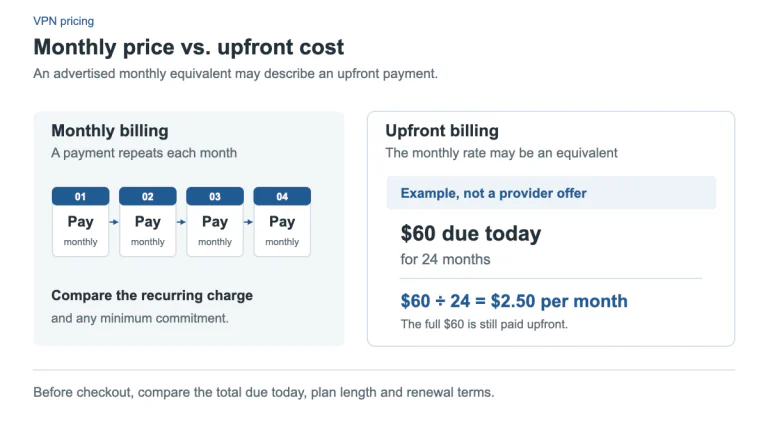
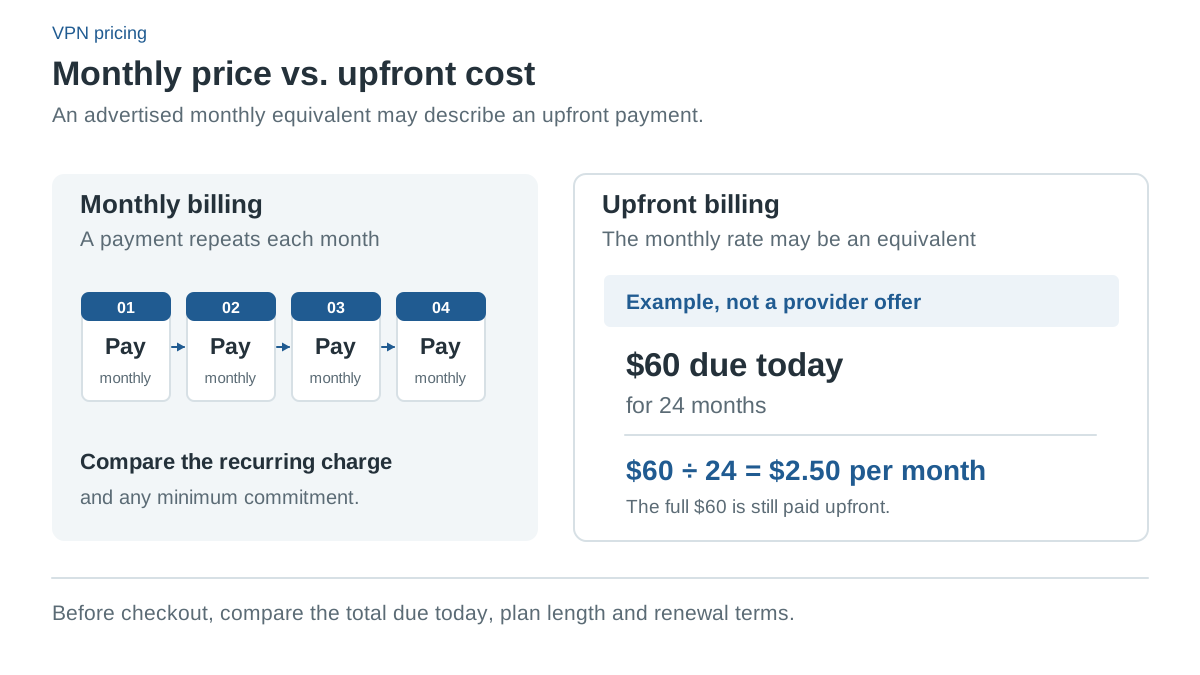
Record the recurring amount at purchase and set your own reminder if you plan to reassess the service. Bonus months and introductory rates often belong only to the first term. Our cost guide shows how to calculate the initial and renewal equivalents separately.
If you only want the introductory term, follow the official cancellation procedure rather than relying on an expired card or deleting the app. If your goal is a refund, follow the separate policy before the applicable deadline and retain the evidence of your request.
Common questions
Which of these VPNs refunds a renewal payment?
PIA’s current terms allow requests within 30 days of an initial purchase or a renewal, subject to eligibility. NordVPN’s ordinary guarantee covers initial purchases, with local-law exceptions in its terms. Surfshark, PureVPN and PrivateVPN exclude renewal payments in their stated policies.
Does canceling auto-renewal refund my last payment?
No. All five providers treat stopping the next renewal and requesting a refund as separate steps. Cancel to stop future charges, then follow the refund process before the deadline if you also want money back.
Is PureVPN’s money-back guarantee longer than the others?
Yes, by one day. PureVPN’s refund policy allows a claim within 31 days of the initial purchase, while NordVPN, Surfshark, PIA and PrivateVPN state 30 days. Renewals, trial conversions, cryptocurrency and app-store purchases are still excluded.
Can I get a refund on PrivateVPN’s one-month plan?
Not under its Terms. They exclude contractual amounts under USD 45, which rules out the $9.90 one-month and $17.99 three-month plans. The $72.00 36-month plan is above that threshold, subject to the other conditions.
Who handles a refund for an App Store or Google Play purchase?
Usually the store. NordVPN, Surfshark, PureVPN and PrivateVPN send App Store refunds to Apple, and PIA’s eligibility guide excludes Apple and Google Play purchases from its direct guarantee. For Google Play, PureVPN points to Google, NordVPN and Surfshark describe separate handling, and PrivateVPN’s Terms do not address it.
Sources and check date
Official sources checked 13 October 2026. Provider terms, app releases and localized offers can change. Documented features are not independent test results.
- NordVPN: Terms of service (refund terms)
- Surfshark: Terms of service
- PIA: How to request a refund
- PureVPN: Refundable and non-refundable payment methods
- PureVPN: Terms of service (refund conditions)
- PureVPN: Billing FAQs (refund request)
- PureVPN: Account management (resume a subscription)
- PureVPN: Cancel App Store and Google Play subscriptions
- PrivateVPN: FAQ (refund wording)
- PrivateVPN: Deleting an account
- NordVPN: US plans, prices and renewals (affiliate link)
- NordVPN: Pricing (affiliate link)
- NordVPN: Supported apps
- NordVPN: Split tunneling
- NordVPN: Kill switch by platform
- NordVPN: Refund policy
- NordVPN: Cancel auto-renewal
- Surfshark: Pricing (affiliate link)
- Surfshark: Billing and renewal prices
- Surfshark: Unlimited devices
- Surfshark: Bypasser platform coverage
- Surfshark: Kill switch setup
- Surfshark: Refund policy
- Surfshark: Cancel auto-renewal
- PIA: Deal page our offer button opens: 2 years + 2 months (affiliate link)
- PIA: Public plans and renewals: www.privateinternetaccess.com/vpn-features/no-logs-vpn
- PIA: Supported apps
- PIA: Desktop split tunneling
- PIA: Desktop kill switch
- PIA: Refund terms
- PIA: Refund eligibility
- PIA: Cancel auto-renewal
- PureVPN: Plans, prices and renewal statements (affiliate link)
- PureVPN: Renewal prices
- PureVPN: 10 devices
- PureVPN: Supported apps
- PureVPN: Split tunneling platforms
- PureVPN: Windows split tunneling
- PureVPN: Android split tunneling
- PureVPN: Kill switch (Windows)
- PureVPN: Refund policy
- PureVPN: Cancel auto-renewal
- PrivateVPN: Pricing and renewal (choose USD) (affiliate link)
- PrivateVPN: Terms: renewal, devices and refunds
- PrivateVPN: Supported apps
- PrivateVPN: Split tunneling (manual WireGuard)
- PrivateVPN: Kill switch by platform
- PrivateVPN: Port forwarding
- PrivateVPN: Stealth VPN
- PrivateVPN: Money-back guarantee
- PrivateVPN: Cancel auto-renewal