What split tunneling changes
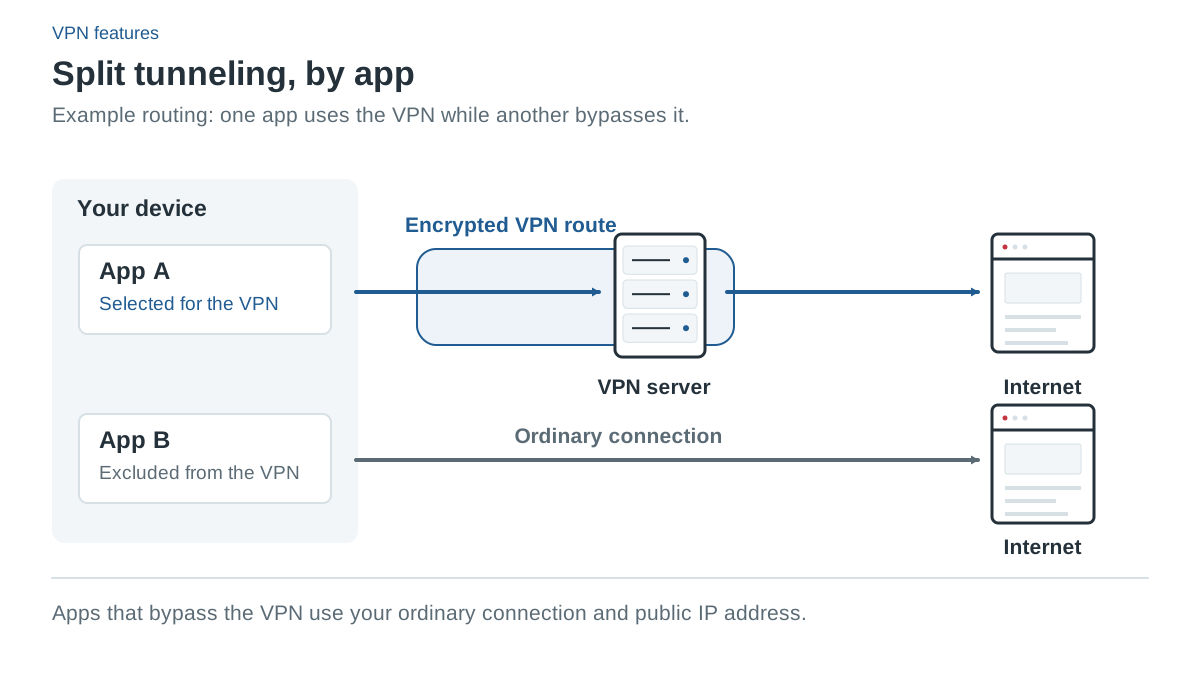
Split tunneling lets selected traffic use a different route from the rest. In one configuration, most traffic uses the VPN and chosen apps bypass it. In another, only selected traffic uses the VPN while everything else stays direct. Providers may call the second design reverse split tunneling or an inverse routing mode.
The rule’s scope matters. A complete desktop application, a website, an IP address and a local subnet are different things. A website exclusion does not establish full app exclusion, and a Linux subnet exception does not identify a particular program.
Direct traffic does not receive the VPN tunnel’s protection. That does not mean all direct traffic is unencrypted: HTTPS can still encrypt the browser’s connection to a website. Routing and application encryption are separate layers.
Useful reasons for an exception
An exception can help when an application or local resource does not work through the selected route, or when you want only a particular program inside the tunnel. For example, a local device on your own network may need a route that the current VPN settings interfere with.
Treat the exception as a limited configuration change rather than a universal fix for blocked sites. It changes exposure and may interact with DNS, kill-switch settings or organizational policy. If a service requires a particular account location or prohibits certain access, routing alone does not establish that the service will work or that its terms permit the use.
Documented platform differences
| Provider | Established routing coverage | Important qualification |
|---|---|---|
| NordVPN | Windows/Android/Android TV apps; Linux port/subnet Allowlist | Linux exceptions bypass the kill switch; Mac/iOS app splitting not listed. |
| Surfshark | Windows/Android/supported Mac apps and sites; iOS websites | iOS is website-only; Linux Bypasser not listed. |
| PIA | Windows/Mac/Linux desktop apps; Android per-app settings | DNS-rule choices documented for Windows/Linux; iOS app splitting unverified. |
| PureVPN | Windows apps; Android, Android TV and Fire TV apps | Windows routes the apps you add through the VPN; Mac/iOS/Linux splitting not documented. |
| PrivateVPN | None in its own apps | Manual WireGuard or OpenVPN client setups only; nothing documented for iOS. |
This table summarizes current provider documentation, not hands-on testing. Operating-system versions, app releases and network-extension requirements can change. Use the provider’s specific current instructions when setting up a rule.
NordVPN’s app rules and Linux Allowlist
NordVPN documents app exclusions on Windows, Android and Android TV. Its Linux Allowlist instead exempts ports and subnets, with matching traffic bypassing both the VPN and kill switch. That is useful to understand before assuming a Linux exception has the same security behavior as a Windows app rule.
Its support also warns that excluded apps may retain Nord DNS and that Internet Kill Switch can take priority over split-tunnel exclusions. A direct data route therefore does not guarantee a program sees the same DNS behavior or connectivity it had before the VPN was installed.
Surfshark Bypasser and reverse mode
Surfshark’s Bypasser lists app and site routing on Windows, Android and supported Macs. Current Mac guidance requires macOS 12 or later and approval of a system extension. The feature does not support Big Sur.
On iOS, exclusions apply to websites rather than full apps. Reverse Bypasser documentation distinguishes Android apps/websites from Windows apps. Linux is absent from the Bypasser platform list, so do not buy it expecting a documented Linux per-app workflow.
PIA desktop rules and documentation conflicts
PIA’s current desktop guide covers app rules on Windows, macOS and Linux. Apps can bypass the tunnel or require VPN connectivity; IP and subnet rules are bypass rules. Default behavior for the remaining apps can also be selected.
Windows and Linux have documented choices for DNS to follow app rules or use the app’s configured resolver. The same DNS setting is not established for macOS. Current Mac setup requires approval of a network extension, despite an older marketing FAQ that states a conflicting compatibility restriction.
PIA’s official blog and detailed iOS settings guide conflict about iPhone app splitting. We have not tested the app to resolve that, so it remains unverified here. Confirm the current capability with support if it is the reason you would purchase.
PureVPN: Windows and Android-based devices only
PureVPN’s feature page lists split tunneling on Windows, Android, Fire TV Stick and Android TV. On Android, Android TV and Fire TV, every app uses the VPN by default, and you can choose “Allow only selected apps to use VPN” or “Do not allow selected apps to use VPN.” The Windows guide documents one direction only: the apps you add are routed through the VPN, and you must add every process of an app that runs several. An exclude mode isn’t documented for Windows, and DNS behavior for routed or excluded apps isn’t documented at all.
No split tunneling is documented for Mac, iPhone or Linux. The iPhone app’s VPN on Demand connects automatically when you open listed websites; PureVPN doesn’t document it as split tunneling. The browser extensions have a bypass list for websites, but they are proxies that cover only the browser. PureVPN’s help overview names only Windows and Android, while the newer feature page and separate guides cover the Android TV and Fire TV apps.
PrivateVPN: no split tunneling in its own apps
PrivateVPN documents no split tunneling inside its own apps on any platform. Its help center offers manual alternatives that use separate clients instead: WireGuard’s AllowedIPs setting can send only listed IP addresses through the tunnel on Windows, Mac and Linux; the OpenVPN GUI on Windows can exclude individual website IPv4 addresses; and the third-party OpenVPN for Android and WireGuard for Android apps can include or exclude apps. Nothing is documented for iPhone, Fire TV, Android TV or ChromeOS.
Two other features can look similar but are not VPN routing rules. The Chrome option pairs the Proxy Switcher extension with PrivateVPN’s HTTP proxy and a bypass list, so it covers websites in that browser through a proxy, not the VPN. Application Guard on Windows closes selected programs if the VPN connection is lost, which the kill-switch guide explains. If per-app routing inside the provider’s own app is a requirement, PrivateVPN’s documentation does not support it.
Why DNS can make results confusing
An application’s connection route and the resolver used for its name lookups are related but distinct. A browser may also use its own encrypted DNS provider. A site can therefore behave differently from what a simple public-IP check suggests.
If an excluded app still fails, review DNS behavior and the provider’s known limitations before widening the exception. Avoid changing several settings at once: record the original configuration, make one supported change, and check the result with ordinary non-sensitive activity.
The DNS leak guide explains why an unexpected resolver name is a prompt to investigate rather than automatic proof of a leak. The kill-switch guide explains which blocking behavior to confirm alongside exclusions.
A practical setup checklist
- Define the requirement: app, website, destination address or local subnet.
- Confirm the installed app and OS support that exact rule type.
- Decide whether most traffic should use the VPN or remain direct.
- Review DNS and kill-switch interactions in the platform guide.
- Add the narrowest supported exception and test ordinary activity.
- Remove the rule when it is no longer needed, if your intended configuration is full-tunnel access.
Use our provider comparisons to choose by established controls rather than a generic split-tunneling check mark.
Common questions
Does PrivateVPN have split tunneling?
Not in its own apps. Its help center documents manual setups with separate WireGuard or OpenVPN clients, which route by IP address on desktop and by app on Android. NordVPN, Surfshark, PIA and PureVPN document app rules inside their own apps on specific platforms.
Does PureVPN split tunneling work on a Mac or iPhone?
Not according to its current documentation, which covers Windows, Android, Android TV and Fire TV. The iPhone app’s VPN on Demand connects automatically for listed websites, but PureVPN doesn’t document it as split tunneling. Surfshark documents Mac app routing and iPhone website exclusions if you need either.
Which of these VPNs documents app split tunneling on Linux?
PIA is the only one of the five with documented Linux app rules. NordVPN’s Linux Allowlist works on ports and subnets, Surfshark doesn’t list Linux for Bypasser, PureVPN documents nothing for Linux, and PrivateVPN offers only a manual WireGuard method that routes by IP address.
Sources and check date
Official sources checked 13 October 2026. Provider terms, app releases and localized offers can change. Documented features are not independent test results.
- NordVPN: Split tunneling platforms
- NordVPN: How Kill Switch and split tunneling interact
- Surfshark: Bypasser on macOS
- Surfshark: macOS requirements
- Surfshark: No app bypassing on iOS
- PIA: Per-app settings on Android
- PIA: Older split-tunneling FAQ (Mac note)
- PIA: iOS settings guide
- PIA: Blog post on iOS per-app settings
- PureVPN: Split tunneling help overview
- PureVPN: Split tunneling on Android TV
- PureVPN: Split tunneling on Fire TV
- PureVPN: iOS app settings (VPN on Demand)
- PureVPN: Chrome extension bypass list
- PrivateVPN: Split tunneling with OpenVPN GUI on Windows
- PrivateVPN: Split tunneling with OpenVPN for Android
- PrivateVPN: Split tunneling with WireGuard for Android
- PrivateVPN: Chrome proxy bypass list
- PrivateVPN: Application Guard on Windows
- NordVPN: US plans, prices and renewals (affiliate link)
- NordVPN: Pricing (affiliate link)
- NordVPN: Supported apps
- NordVPN: Split tunneling
- NordVPN: Kill switch by platform
- NordVPN: Refund policy
- NordVPN: Cancel auto-renewal
- Surfshark: Pricing (affiliate link)
- Surfshark: Billing and renewal prices
- Surfshark: Unlimited devices
- Surfshark: Bypasser platform coverage
- Surfshark: Kill switch setup
- Surfshark: Refund policy
- Surfshark: Cancel auto-renewal
- PIA: Deal page our offer button opens: 2 years + 2 months (affiliate link)
- PIA: Public plans and renewals: www.privateinternetaccess.com/vpn-features/no-logs-vpn
- PIA: Supported apps
- PIA: Desktop split tunneling
- PIA: Desktop kill switch
- PIA: Refund terms
- PIA: Refund eligibility
- PIA: Cancel auto-renewal
- PureVPN: Plans, prices and renewal statements (affiliate link)
- PureVPN: Renewal prices
- PureVPN: 10 devices
- PureVPN: Supported apps
- PureVPN: Split tunneling platforms
- PureVPN: Windows split tunneling
- PureVPN: Android split tunneling
- PureVPN: Kill switch (Windows)
- PureVPN: Refund policy
- PureVPN: Cancel auto-renewal
- PrivateVPN: Pricing and renewal (choose USD) (affiliate link)
- PrivateVPN: Terms: renewal, devices and refunds
- PrivateVPN: Supported apps
- PrivateVPN: Split tunneling (manual WireGuard)
- PrivateVPN: Kill switch by platform
- PrivateVPN: Port forwarding
- PrivateVPN: Stealth VPN
- PrivateVPN: Money-back guarantee
- PrivateVPN: Cancel auto-renewal