What a kill switch is intended to do
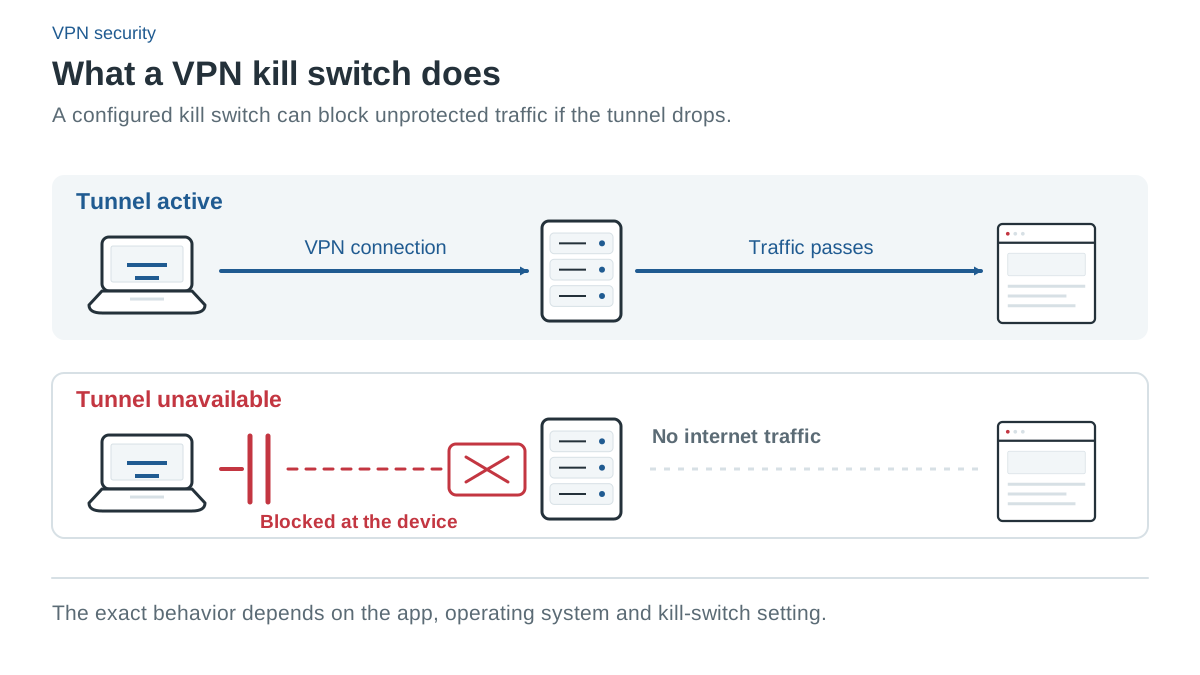
A VPN kill switch is intended to prevent some traffic from taking an unwanted direct route when the VPN is unavailable. Its actual behavior depends on the app, operating system, mode and routing exceptions. A setting that handles an unexpected tunnel drop is not necessarily a setting that blocks traffic after you deliberately disconnect.
This distinction matters because users may want different behavior. Someone who needs all connectivity blocked until a VPN is active may choose a strict or advanced mode. Someone who expects normal internet access after manually turning the VPN off should verify that the selected mode permits it.
We explain current provider documentation here. We have not tested these modes on devices for The VPN Deal, so the guide does not certify event-by-event leak prevention or claim that a particular platform cannot expose traffic.
Four events to distinguish
| Event | What to establish in the current app |
|---|---|
| Unexpected tunnel loss | Does traffic block while the app reconnects? |
| Manual VPN disconnect | Does blocking continue, or is direct access intentionally restored? |
| VPN app exit | Does the operating system retain a blocking rule? |
| Device reboot or network change | When does the protection become active again? |
A provider’s setup page may describe only some of these events. If another behavior matters to you, look for its exact documentation or confirm it with support. Do not infer persistent protection after a reboot from a generic statement about connection loss.
NordVPN: network blocking and selected-app closure
NordVPN documents two Windows controls: Internet Kill Switch and App Kill Switch. The first controls connectivity; the second closes selected programs and is off by default. Closing a browser or file-transfer application is a different action from leaving it open with no network access.
Its platform guide also distinguishes the website Mac version from the Mac App Store version. The website version has an app kill switch; the App Store version and iOS use routing-level protection called VPN bypass prevention in current guidance. Linux has system-wide blocking after a drop or manual disconnect, with Allowlist exceptions. Fire TV Stick lacks a kill switch in the cited platform guide.
NordVPN separately warns that Internet Kill Switch can take priority over split-tunnel exclusions. An excluded app may therefore be blocked even while a VPN connection exists. Read the current interaction guide instead of assuming that every exclusion always stays online.
Surfshark: soft and strict definitions
Surfshark describes soft protection after an unexpected disconnect and strict protection whenever the VPN is off, including manual disconnection. Its platform setup guide documents a kill switch across the main desktop and mobile systems, but does not establish that every operating system exposes both modes as selectable controls.
The practical step is to read the current app’s setting and the specific platform instructions. If you want normal internet access after manually stopping the VPN, that preference differs from requiring the tunnel for every connection. Select a documented mode that matches the requirement rather than assuming a default.
PIA: ordinary, advanced and mobile behavior
PIA’s desktop VPN Kill Switch covers connection loss. Advanced Kill Switch requires a VPN even when it has been turned off, and Windows support says its protection can persist with the app closed. Its desktop “Only VPN” rule can also require a selected app to have tunnel connectivity.
Android setup uses the operating system’s Always-on VPN and Block connections without VPN options. On iOS, PIA’s setup and settings guides say the kill switch is enabled by default for unexpected drops and reconnection, but does not cover manual disconnect. A desktop advanced mode therefore should not be assumed to describe the iPhone app.
PureVPN: Internet Kill Switch in the desktop apps
PureVPN’s Internet Kill Switch “automatically disconnects your internet connection if the VPN connection drops.” Its support guides place it in the Connection tab on Windows and in the advanced settings of the Mac app and the Linux app with a graphical interface. They describe unexpected drops only: behavior after a manual disconnect isn’t documented, and neither is the default state. The Windows guide tells you to turn it on, so don’t assume it is active after installation.
On Android, PureVPN’s guide uses the operating system’s Always-on VPN with Block connections without VPN, which leaves you without an internet connection until the VPN connects. Its iPhone settings guide lists Reconnect on disconnect and VPN on Demand but no kill switch. None is documented for Android TV, Fire TV, the Linux command-line app or the browser extensions.
PrivateVPN: Connection Guard and Application Guard
PrivateVPN’s FAQ says that if the VPN connection suddenly fails, its kill switch “automatically stops all internet traffic” until you reconnect. The setup guide puts the switch under Connection Guard in the Windows and Mac apps, where the Mac app offers Auto and Always modes that the guide doesn’t define, and under VPN Settings on Android. The iPhone app has no separate toggle: the guide says to choose the IKEv2 protocol, which “includes a built-in kill switch.” Linux has no PrivateVPN app, only a manual firewall script for OpenVPN. Default settings and behavior after a manual disconnect aren’t documented.
The Windows app also has Application Guard, which “will automatically terminate the selected program if the VPN connection is lost.” That is comparable to NordVPN’s App Kill Switch rather than a network block, and it isn’t a routing exception: the split-tunneling guide explains that PrivateVPN’s apps have no built-in split tunneling. PrivateVPN’s marketing page lists more kill-switch platforms, including Kodi and routers, than its help center documents, so go by the platform guides.
Split tunneling creates additional questions
When an app or network is deliberately allowed to bypass the tunnel, ask whether the kill switch also exempts it. NordVPN documents a Linux Allowlist that bypasses both. Other rule types can interact differently with blocking or DNS settings.
Keep the intended exceptions narrow. A direct route may be useful for a local device or an application, but it does not receive the VPN tunnel’s protection. HTTPS can still protect a website connection, which is a separate layer from the routing choice.
How to check your configuration responsibly
First read the exact platform guide and record the selected mode. Use ordinary, non-sensitive browsing to assess whether connectivity blocks during the documented events. Avoid experimenting with traffic that would cause harm if it used a direct connection.
Checking a public IP address alone does not establish complete protection. DNS, IPv6, browser routing and application exceptions are separate concerns. A single successful reconnection is not proof of behavior after every app exit or reboot. Our DNS leak guide explains the limits of browser-based checks.
If the app behaves differently from its documentation, retain the settings and version details and contact the provider’s support. A provider recommendation on this site cannot replace validating a configuration that matters to you.
Common questions
Does a kill switch keep blocking traffic after I disconnect the VPN myself?
Only some modes do. Surfshark’s strict mode, where the app offers it, PIA’s Advanced Kill Switch and NordVPN’s Linux kill switch are documented to block traffic when the VPN is off or manually disconnected. PIA’s iOS kill switch does not cover manual disconnection, and PureVPN and PrivateVPN don’t document what happens after one.
Does PureVPN have a kill switch on iPhone?
Not according to its current documentation. PureVPN’s iOS settings guide lists Reconnect on disconnect and VPN on Demand, but no kill switch. Its Internet Kill Switch is documented for the Windows and Mac apps and the Linux GUI app.
What does PrivateVPN’s Application Guard do?
It closes the Windows programs you select if the VPN connection is lost, and it is available only in PrivateVPN’s Windows app. Closing a program is a different action from blocking network traffic, which is the kill switch’s job. Among the providers covered here, NordVPN’s Windows App Kill Switch is the closest equivalent.
Sources and check date
Official sources checked 13 October 2026. Provider terms, app releases and localized offers can change. Documented features are not independent test results.
- NordVPN: How Kill Switch and split tunneling interact
- Surfshark: Kill Switch modes
- PIA: Windows kill switch settings
- PIA: Kill switch on Android
- PIA: iOS app setup and defaults
- PIA: iOS settings and manual disconnect
- PureVPN: Kill switch in the Mac app
- PureVPN: Kill switch in the Linux app
- PureVPN: Android Always-on VPN
- PureVPN: iOS app settings
- PrivateVPN: FAQ (kill switch)
- PrivateVPN: Application Guard on Windows
- PrivateVPN: Manual kill switch on Linux
- PrivateVPN: Kill switch feature page
- NordVPN: US plans, prices and renewals (affiliate link)
- NordVPN: Pricing (affiliate link)
- NordVPN: Supported apps
- NordVPN: Split tunneling
- NordVPN: Kill switch by platform
- NordVPN: Refund policy
- NordVPN: Cancel auto-renewal
- Surfshark: Pricing (affiliate link)
- Surfshark: Billing and renewal prices
- Surfshark: Unlimited devices
- Surfshark: Bypasser platform coverage
- Surfshark: Kill switch setup
- Surfshark: Refund policy
- Surfshark: Cancel auto-renewal
- PIA: Deal page our offer button opens: 2 years + 2 months (affiliate link)
- PIA: Public plans and renewals: www.privateinternetaccess.com/vpn-features/no-logs-vpn
- PIA: Supported apps
- PIA: Desktop split tunneling
- PIA: Desktop kill switch
- PIA: Refund terms
- PIA: Refund eligibility
- PIA: Cancel auto-renewal
- PureVPN: Plans, prices and renewal statements (affiliate link)
- PureVPN: Renewal prices
- PureVPN: 10 devices
- PureVPN: Supported apps
- PureVPN: Split tunneling platforms
- PureVPN: Windows split tunneling
- PureVPN: Android split tunneling
- PureVPN: Kill switch (Windows)
- PureVPN: Refund policy
- PureVPN: Cancel auto-renewal
- PrivateVPN: Pricing and renewal (choose USD) (affiliate link)
- PrivateVPN: Terms: renewal, devices and refunds
- PrivateVPN: Supported apps
- PrivateVPN: Split tunneling (manual WireGuard)
- PrivateVPN: Kill switch by platform
- PrivateVPN: Port forwarding
- PrivateVPN: Stealth VPN
- PrivateVPN: Money-back guarantee
- PrivateVPN: Cancel auto-renewal